

RESEARCH
Learning from two ends of the equasion:
Students and educators
To gain a deeper insight about this problem space, we interviewed 40+ students, 28 professors and surveyed 500+ faculties.
42
Undergraduate students surveyed
18 STEM, 20 humanities, 4 business major
97%
Knew a classmate who has used AI to cheat.
4% admitted cheating with AI.
86% expressed confusion about AI and what’s allowed and not.
86%
Used AI as a replacement for office hours.
They complained that AI inputs did not always aligned with the methods thought in their classes.
On the other side, we learned that faculties are either facing top down policies that conflicts with their teaching or left alone to figure out how to adopt AI.

82%
Did not feel they receive the right support from their institutions to adopt AI.
78% expressed that they don’t know how to adopt AI in their teaching process.
Survey size: 512 faculties and administrators
80%
Worried about AI plagiarism (top Concern)

Concern about AI impact
The research showed a clear need in the market. Educators are concerned about the impact of AI on their work and are not getting the support from their institutions to deal with this problem. Next, I started to look into how they address these problems.
SOlution Space
Organic and tool based solutions
Move from writing assignments to oral presentations
Problem: The solution did not work for online classes and was not practical for large class sizes.
Move to blue books and in-class pen and paper writing
Problem: The solution did not work for online classes and the in-class writing wasn't the substitute for in-depth paper writing. Readability was also an expressed issue.
AI writing detectors
Problem: AI detectors such as GPTZero are using statistical model against ever-improving LLMs and their results have too much false positive and false negative. The lack of accuracy is why they are getting banned from universities but the bigger issue with them was that they come in after student's learning opportunity is already lost.
IDIATION
Searching a solution that embrace the new AI reality, not to fight it.
I looked into the fundamentals of what's getting impacted by AI and tried to build a framework by which solutions can be conceived.
Process
AI is increasingly getting better at producing outputs. Are processes becoming more component of evaluating students' works?
74% want to see steudent's process
Control
Unfettered AI use is the biggest source of probelm.
Would educators allow AI use if they could control its behavior and functions within students' work?
87% want to define AI behavior
Transparency
Would student become more mindful in their AI use if the footprints of AI in their writing become transparent to their teammates and professors?
56% want to have access to AI history
Two months later, I had identified a problem, had a validated vision and direction, and a talented team, passionate about the space and the problem and ready to fix it.

That's how the journey started. Maybe the more impressive part of this project was on the engineering and team leadership, but I'm also proud of this project from the design perspective. In the following, I'll go over some of the design decisions and how I translated the vision into a product.
PROCESS VS. END RESULT
Showing student's entire process instead of final resault
With AI continuing to get better at producing outputs, the work process that leads to those outputs are increasingly becoming more important for the educators. I tried to make Typerighter to showcase

The temporary fix provided a very basic structure that allowed users to better focus on different components of the code. Users were also able to type React in the JS panel.
While I knew that this was far from what users needed, this short-term remedy allowed our sales team to stop the bleeding so we could focus on the ultimate solution.
The solution space
How did the pad environment need to evolve?
We didn't need to go far to learn about the front-end interviewing process and what we needed to consider. We sat with our great internal engineering team to learn about their past interviews and their actual work process.
CSS/JSS/SASS
Writing test cases / Testing frameworks
Logic Layer
JS/TS
Result rendering
Knowledge of libraries (Flex, Redux, Apollo, ect.)
Debugging (less in interviews)
System design vs. generic tests
Webpack
Package management
To allow more complex assessment tasks, I boiled down the needs to the following:
- File-tree to allow candidates navigate and create structures.
- A way for users to see the existing packages and install new ones.
- Allow users to compile code and monitor server status.
Design Exploration
Designing for the most stressful professional context
It's not news that everyone, regardless of their confidence and competence, feels nervous during an interview. It was my job to make sure candidates felt right at home when they started their interview session. They should feel completely familiar with their interview environment and be able to focus on their tasks. To achieve that, I started reveiwing different code editors and understand their design and affordances to extract the common patterns among them.

I needed to find the balance and know where to stick with the patterns and when to deviate from them. Here are some examples:
Open files tab system: Jumping easily between files is crucial in a work context. However, during an interview, the priority was to keep participants on the same file. Tabs complicated the collaborative interactions, so they were not included in the final solution.
Package management: From a design perspective, a custom solution for package management made perfect sense. However, we chose not to pursue this idea in favor of aligning the interaction with real-life methods.

And after exploring tens of different design variations, the general structure of our IDE was born. Drag the circle to see the before and after versions.
Making the design real
Sacrificing nice for practical
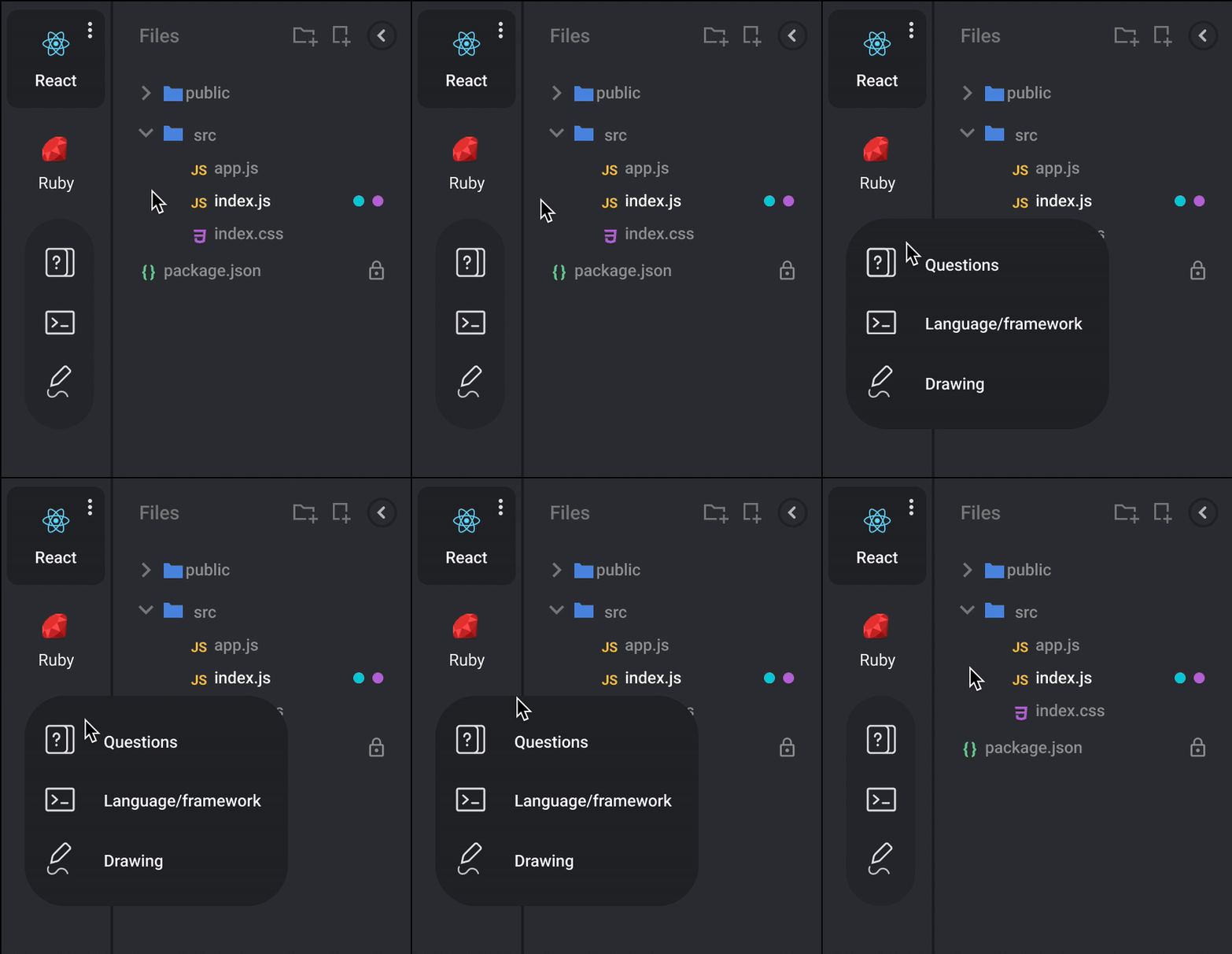
In technical interviews, some companies allow candidates to pick their preferred language. In the old version, picking a new language was simply commenting out the old code and allowing you to write code in the new language. In the multi-file environment this was no longer possible. We had to come up with a new structure to lay down the pad options. I added a tab bar to the pad and came up with different ways to display the options. That's how I added the tabs to separate the environments.
I love creative design but when it comes to navigation, I am a conservative… There I said it! I always fall for the most clear and familiar design. What would you think I'll pick here?


Optimizing the design
Getting ready for the prime-time
With the numerous changes and additional features added, we needed to ensure that both existing and new users could navigate the environment seamlessly. For example, usability research helped us fine-tune our language selector. While search was the more optimal method for language selection, we discovered that the visual appeal of the language icons deterred users from using the search. With some simple design tweaks, we were able to increase search usage.

First-click tests helped us ensure that the placement of certain options matched users' expectations.

Despite all those steps, given the sensitivity of the interview session, I wanted the existing users to feel fully in control. I gave interviewers an escape hatch.

The research and all the preparation paid off. Very few people felt the need to go back to the old UI. In roughly 3000 sessions, only in 98 sessions, users decided to switch backed to the old UI.
Go to Market
CoderPad 2.0 was born. Did customers go crazy on it?
Not so quickly. While we knew the demand was there, we learned that teams design their interview process for each role, and breaking their interview routine not easy. So like any new product, we needed to promote and educate our customers about the changes.

We promoted the new features in our e-mails, within product contextual ads, created new landing pages, and more to make users adopt and use the big product investment we did. And eventually, all the hard work paid off.
The IMpact
What was the result of this 6-month-long project?
The team set some targets and within a year after the framework's public launch, we achieved some impressive results.

27% of usage on new accounts was on frameworks.
46% of existing accounts started to use frameworks.
Total Front-end usage doubled and jumped from 4.2% to 9% of total pad usage
Later on, additional frameworks were supported which helped the frameworks usage to jump to 28% of the total usage